快速开始
安装
pip install rapid-layout onnxruntime
如需使用 OpenVINO 引擎,请额外安装:pip install openvino。
运行
不传参数时使用默认模型 pp_layout_cdla 与 onnxruntime 引擎:
| from rapid_layout import RapidLayout
layout_engine = RapidLayout()
img_path = "https://raw.githubusercontent.com/RapidAI/RapidLayout/718b60e927ab893c2fad67c98f753b2105a6f421/tests/test_files/layout.jpg"
results = layout_engine(img_path)
print(results)
results.vis("layout_res.png")
|
通过关键字参数指定 model_type、engine_type、conf_thresh 等:
| from rapid_layout import EngineType, ModelType, RapidLayout
layout_engine = RapidLayout(
model_type=ModelType.PP_LAYOUT_CDLA,
engine_type=EngineType.ONNXRUNTIME,
conf_thresh=0.5,
)
img_path = "https://raw.githubusercontent.com/RapidAI/RapidLayout/718b60e927ab893c2fad67c98f753b2105a6f421/tests/test_files/layout.jpg"
results = layout_engine(img_path)
print(results)
results.vis("layout_res.png")
|
| from rapid_layout import EngineType, ModelType, RapidLayout, RapidLayoutInput
cfg = RapidLayoutInput(
model_type=ModelType.PP_LAYOUT_CDLA,
engine_type=EngineType.ONNXRUNTIME,
)
layout_engine = RapidLayout(cfg=cfg)
img_path = "https://raw.githubusercontent.com/RapidAI/RapidLayout/718b60e927ab893c2fad67c98f753b2105a6f421/tests/test_files/layout.jpg"
results = layout_engine(img_path)
print(results)
results.vis("layout_res.png")
|
| rapid_layout test_images/layout.png
rapid_layout test_images/layout.png -m pp_layout_cdla --conf_thresh 0.5
|
构造函数参数说明
RapidLayout(cfg=None, **kwargs) 支持以下关键字参数(与 RapidLayoutInput 一致):
| 参数 |
类型 |
默认值 |
说明 |
model_type |
ModelType 或 str |
pp_layout_cdla |
模型类型,见 模型列表 |
model_dir_or_path |
str / Path / None |
None |
模型路径,不传则按 model_type 自动解析 |
engine_type |
EngineType 或 str |
onnxruntime |
推理引擎:onnxruntime、openvino |
engine_cfg |
dict |
{} |
引擎额外配置,见 engine_cfg.yaml |
conf_thresh |
float |
0.5 |
框置信度阈值 [0, 1] |
iou_thresh |
float |
0.5 |
IoU 阈值 [0, 1] |
传入 cfg 时,kwargs 会覆盖同名字段。
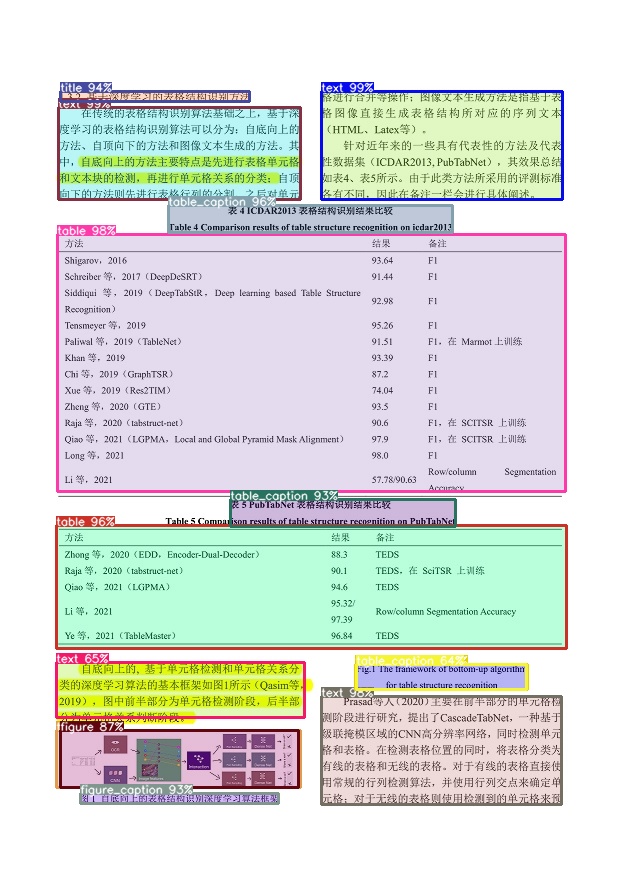
可视化结果