信创级开源 OCR - 为世界内容安全贡献力量
### 📝 简介
RapidOCR 是一款完全开源免费、支持离线快速部署的多平台多语言 OCR 工具,以极致的速度与广泛的兼容性为核心优势。
**支持语言:** 默认支持中英文识别。其他支持的语言,参见文档:[模型列表](https://rapidai.github.io/RapidOCRDocs/main/model_list/)
**项目缘起:** 鉴于 [PaddleOCR](https://github.com/PaddlePaddle/PaddleOCR) 在工程化方面仍有优化空间,为简化并加速 OCR 模型在各类终端设备上的推理部署,我们创新性地将 PaddleOCR 中的模型转换为高度兼容的 ONNX 格式,并基于 Python, C++, Java, C# 等多种编程语言,实现了跨平台的无缝移植,让开发者能够轻松上手、高效集成。
**名称寓意:** RapidOCR 这一名称承载着我们对产品的核心期待——轻快(操作简便、响应迅速)、好省(资源占用低、成本效益高)且智能(依托深度学习技术,实现精准高效的识别)。我们专注于发挥人工智能的优势,打造小巧而强大的模型,始终将速度作为不懈追求,同时确保卓越的识别效果。
**使用指南:**
- **直接部署**:若本仓库提供的模型已满足您的需求,只需参考 [快速开始](https://rapidai.github.io/RapidOCRDocs/main/quickstart/) 即可快速完成 RapidOCR 的部署与使用。
- **定制化微调**:若现有模型无法满足特定场景需求,您可在 PaddleOCR 基础上,利用自有数据进行微调,再将优化后的模型应用于 RapidOCR 的部署流程,实现个性化定制。
如果您觉得本项目对您的工作或学习有所帮助,恳请您不吝赐予一颗 ⭐ Star,给予我们宝贵的支持与鼓励!
### 整体框架
```mermaid
---
config:
fontFamily: "LXGW WenKai Screen"
---
flowchart LR
subgraph Step
direction TB
C(Text Det) --> D(Text Cls) --> E(Text Rec)
end
A[/OurSelf Dataset/] --> B(PaddleOCR) --Train--> Step --> F(PaddleOCRModelConverter)
F --ONNX--> G{RapidOCR Deploy\nPython/C++/Java/C#}
G --> H(Windows x86/x64) & I(Linux) & J(Android) & K(Web) & L(Raspberry Pi)
click B "https://github.com/PaddlePaddle/PaddleOCR" _blank
click F "https://github.com/RapidAI/PaddleOCRModelConverter" _blank
```
### 🎥 效果展示
### 👥 谁在使用?([更多](https://github.com/RapidAI/RapidOCR/discussions/286))
- [Docling](https://github.com/docling-project/docling)
- [CnOCR](https://github.com/breezedeus/CnOCR)
- [api-for-open-llm](https://github.com/xusenlinzy/api-for-open-llm)
- [arknights-mower](https://github.com/ArkMowers/arknights-mower)
- [pensieve](https://github.com/arkohut/pensieve)
- [genshin_artifact_auxiliary](https://github.com/SkeathyTomas/genshin_artifact_auxiliary)
- [ChatLLM](https://github.com/yuanjie-ai/ChatLLM)
- [langchain](https://github.com/langchain-ai/langchain)
- [Langchain-Chatchat](https://github.com/chatchat-space/Langchain-Chatchat)
- [JamAIBase](https://github.com/EmbeddedLLM/JamAIBase)
- [PAI-RAG](https://github.com/aigc-apps/PAI-RAG)
- [ChatAgent_RAG](https://github.com/junyuyang7/ChatAgent_RAG)
- [OpenAdapt](https://github.com/OpenAdaptAI/OpenAdapt)
- [Umi-OCR](https://github.com/hiroi-sora/Umi-OCR)
> 更多使用 RapidOCR 的项目,欢迎在 [登记地址](https://github.com/RapidAI/RapidOCR/discussions/286) 登记,登记仅仅为了产品推广。
### 🎖 贡献者

### 📜 引用
如果您发现该项目对您的研究有用,请考虑引用:
```bibtex
@misc{RapidOCR 2021,
title={{Rapid OCR}: OCR Toolbox},
author={RapidAI Team},
howpublished = {\url{https://github.com/RapidAI/RapidOCR}},
year={2021}
}
```
### ⭐️ Star history
[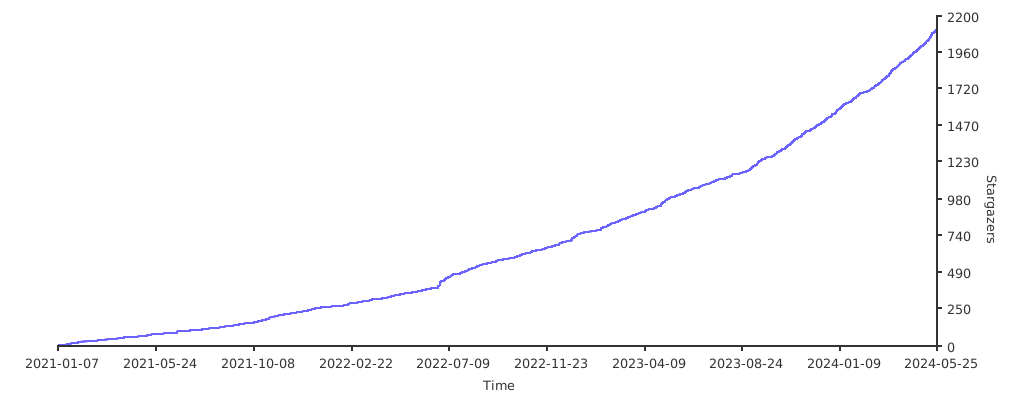](https://starchart.cc/RapidAI/RapidOCR){.no-radius}
### ⚖️ 开源许可证
OCR 模型版权归百度所有,其他工程代码版权归本仓库所有者所有。
该项目采用 [Apache 2.0 license](https://github.com/RapidAI/RapidOCR/blob/90024f8d2290c484b56f617bbae6c9f98f04f7a4/LICENSE) 开源许可证。