Usage
Introduction
This section covers how to use the rapidocr library to perform text recognition on images. It mainly explains two ways of using the rapidocr library: Python scripts and the CLI terminal.
In rapidocr>=3.10.0, RapidOCR() does not construct all models immediately during initialization; the corresponding models are loaded only when detection, classification, or recognition is called for the first time. The first call may take slightly longer, and subsequent calls return to normal.
Python Script Usage
Everything uses the default values.
In rapidocr>=3.9.0, the defaults are Det PP-OCRv6 small + Cls PP-OCRv4 mobile + Rec PP-OCRv6 small.
In rapidocr<3.9.0, the defaults are Det PP-OCRv4 mobile + Cls PP-OCRv4 mobile + Rec PP-OCRv4 mobile.
It is recommended to first use the ONNX Runtime CPU version as the inference engine.
For detailed parameter settings of other default values, see: config.yaml
Using models of different sizes; all other unspecified parameters use their default values.
Initializing RapidOCR Instance Input
The input supports passing in a YAML-format configuration file, and also supports passing parameters directly.
-
Generate the default_rapidocr.yaml configuration file. Run the following code in the terminal to generate the default default_rapidocr.yaml file in the current directory.
-
Modify the corresponding values in default_rapidocr.yaml according to your needs. For example, to use OpenVINO as the inference engine for text detection, along with the
ch_mobile, PP-OCRv4 version model, change it as follows: -
Pass it into
RapidOCRfor use.
Tip
After rapidocr>=3.0.0, the settings of the three parameters engine_type, lang_type, model_type and ocr_version were moved down to the three stages of text detection, text line orientation classification, and text recognition. This is more flexible. You can specify different inference engines and different model types for different stages.
Since rapidocr involves many adjustable parameters, for ease of maintenance the omageconf library is introduced to update parameters. The trade-off is that passing parameters is not as intuitive as in the 1.x series. However, the current approach is still easy to understand and use.
For example, if I want to use OpenVINO as the inference engine for each stage, I can use it in the following way:
For other ways of passing parameters, basically just refer to config.yaml; separate the keys with dots and write them directly. For example:
| config.yaml Partial Parameter Example | |
|---|---|
Image Input
RapidOCR supports multiple image input methods such as file paths, URLs, bytes, NumPy, Pillow, and memory addresses. For details, see: Image Input.
Output
RapidOCR output includes 4 types: Union[TextDetOutput, TextClsOutput, TextRecOutput, RapidOCROutput]. All 4 types are Dataclasses classes, and you can directly access the corresponding key values.
TextDetOutput: Detection onlyTextClsOutput: Text line direction classification onlyTextRecOutput: Recognition onlyRapidOCROutput: Detection + direction classification + recognition
The detailed combinations are as follows:
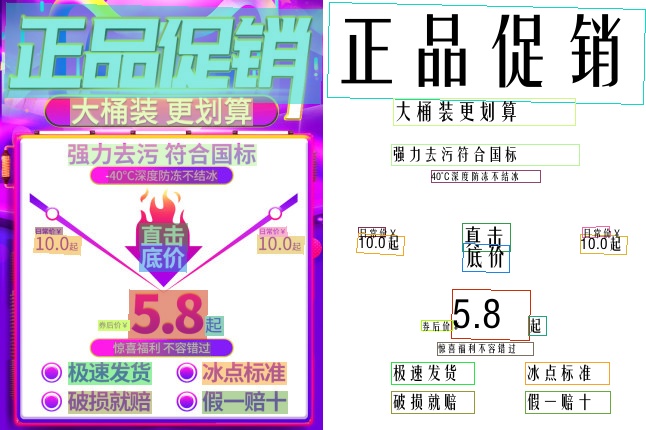
The return value is RapidOCROutput, which can be accessed directly via result.xxxx. It mainly contains the following fields:
RapidOCROutput.img (np.ndarray): The original input imageRapidOCROutput.boxes (np.ndarray): The coordinate box of each line in the image, with shape(N, 4, 2).Nindicates how many text lines there are.RapidOCROutput.txts (Tuple[str]): The recognized text content corresponding to theboxestext boxes. Its length is consistent with the length ofRapidOCROutput.boxes.RapidOCROutput.scores (Tuple[float]): The confidence of the recognized text result for each line. Its length is consistent with the length ofRapidOCROutput.boxes.RapidOCROutput.word_results (Tuple[Any]): This part of the result only has a value whenreturn_word_box=True.RapidOCROutput.elapse_list (List[float]): The respective inference time of the three parts: text detection, text line direction classification, and text recognition, in seconds.RapidOCROutput.elapse (float): The overall time of the three parts, in seconds.
Detailed Return Value Example
Tip
The prerequisite for the combination of text detection and text recognition only to work properly is: make sure that the text in the input image is all upright.
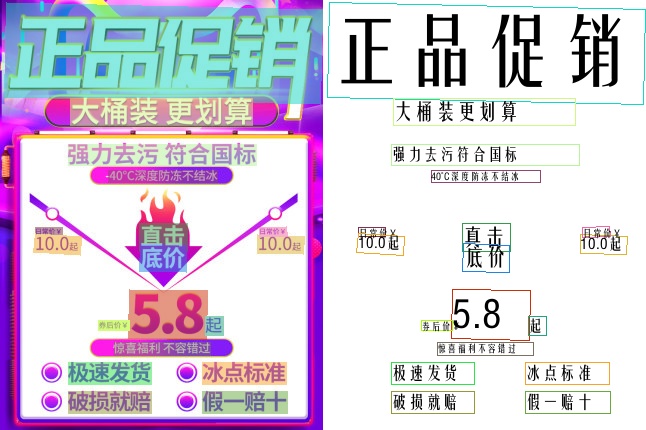
The return value type is the same as in the Detection + Classification + Recognition section.

The return value is the TextClsOutput class, which mainly contains the following fields:
TextClsOutput.img_list (List[np.ndarray]): A list composed of multiple text line images.TextClsOutput.cls_res (List[Tuple(str, float)]): The direction and confidence corresponding to each text line.TextClsOutput.elapse (float): The recognition time, in seconds.
Detailed Return Value Example
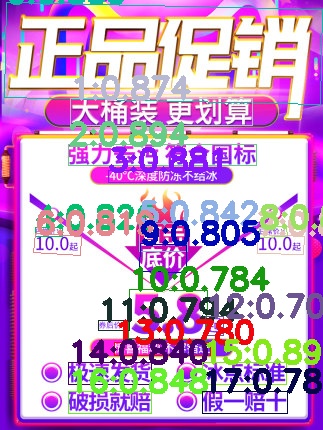
The return value is of the TextDetOutput class and mainly contains the following fields:
TextDetOutput.img (np.ndarray): The original input imageTextDetOutput.boxes (np.ndarray): Text line coordinates, consisting of 4 points, in the order[top-left, top-right, bottom-right, bottom-left]TextDetOutput.scores (List[float]): The confidence score corresponding to each text line.TextDetOutput.elapse (float): The overall text detection time, in seconds.
Detailed return value example

The return value is of the TextClsOutput class and mainly contains the following fields:
TextClsOutput.img_list (List[np.ndarray]): A list composed of multiple text line images.TextClsOutput.cls_res (List[Tuple(str, float)]): The orientation and confidence corresponding to each text line.TextClsOutput.elapse (float): The recognition time, in seconds.

The return value is of the TextRecOutput class and mainly contains the following fields:
TextRecOutput.imgs (List[np.ndarray]): A list composed of multiple text line images.TextRecOutput.txts (List[Tuple(str, float)]): The recognition result corresponding to each text line.TextRecOutput.scores (float): The recognition result for each text line.TextRecOutput.word_results (Tuple[None]): Has a value only whenreturn_word_box=Trueis specified.
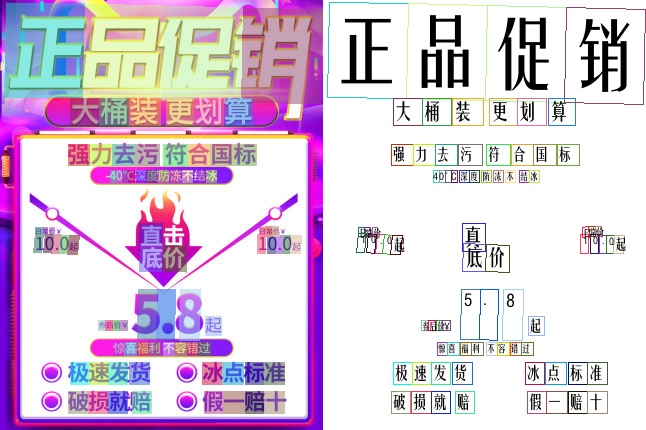
The return value is of the RapidOCROutput class and mainly contains the following fields:
RapidOCROutput.img (np.ndarray): The original input imageRapidOCROutput.boxes (np.ndarray): The coordinate box of each line in the image, with shape(N, 4, 2).Nindicates the number of text lines.RapidOCROutput.txts (Tuple[str]): The recognized text content corresponding to theboxestext boxes. Its length is the same as that ofRapidOCROutput.boxes.RapidOCROutput.scores (Tuple[float]): The confidence of the recognized text result for each line. Its length is the same as that ofRapidOCROutput.boxes.RapidOCROutput.word_results (Tuple[Tuple[str, float, List[List[int]]]]): Composed of(recognized content, confidence, [[top-left], [top-right], [bottom-right], [bottom-left]]).RapidOCROutput.elapse_list (List[float]): The respective inference time of the three parts (text detection, text line orientation classification, and text recognition), in seconds.RapidOCROutput.elapse (float): The overall time of the three parts, in seconds.
Detailed return value example
1 2 3 4 5 6 7 8 9 10 11 12 13 14 15 16 17 18 19 20 21 22 23 24 25 26 27 28 29 30 31 32 33 34 35 36 37 38 39 40 41 42 43 44 45 46 47 48 49 50 51 52 53 54 55 56 57 58 59 60 61 62 63 64 65 66 67 68 69 70 71 72 73 74 75 76 77 78 79 80 81 82 83 84 85 86 87 88 89 90 91 92 93 94 95 96 97 98 99 100 101 102 103 104 105 106 107 108 109 110 111 112 113 114 115 116 117 118 119 120 121 122 123 124 125 126 127 | |
CLI Terminal Usage
Terminal usage is simple, with straightforward commands.
rapidocr check
Automatically checks whether the rapidocr library is installed successfully. The main principle: it uses the ONNX Runtime inference engine to process one image, and checks whether the result meets expectations to determine whether the installation was successful.
Example output:
rapidocr config
Automatically generates the default configuration file used by rapidocr, making it easy to modify and customize.
Example output:
rapidocr download_models
The default config file was added in
rapidocr>=3.8.2.This parameter was added in
rapidocr>=3.7.0.
Pre-downloads the specified models for convenient offline deployment. Because rapidocr has many optional parameters, a specified configuration file is used to quickly download the specified models.
If the --config parameter is not passed, running this command by default downloads the following models into the models directory under the rapidocr installation directory
Example output:
View Supported Languages
rapidocr>=3.10.0 provides --list-langs, which lets you query the languages supported by the current model routing by task, OCR version, and model type:
# Query the languages supported by the PP-OCRv6 medium recognition model
rapidocr --list-langs --task rec --ocr_version PP-OCRv6 --model_type medium
You can also call the same interface in Python:
from rapidocr import RapidOCR

langs = RapidOCR.list_supported_langs("rec", "PP-OCRv6", "medium")
print(langs)