RapidOCR 集成 PP-OCRv6 Rec 模型记录
引言
来自 PaddleOCR官方文档:
PP-OCRv6 是 PP-OCR 最新一代通用文字识别解决方案。PP-OCRv6 基于全新设计的 PPLCNetV4 统一骨干网络,提供 tiny, small, medium 三档模型,分别面向端侧 /IoT、移动端 / 桌面端、服务端场景。PP-OCRv6 在语言覆盖方面实现重大突破,medium/small 档单一模型统一支持简体中文、繁体中文、英文、日文及 46 种拉丁语系语言共 50 种语言(tiny 档支持 49 种,不含日文)。在内部多场景综合评估集上,PP-OCRv6_medium 相比 PP-OCRv5_server 识别精度提升 5.1%、检测精度提升 4.6%,同时 GPU 推理速度提升 2.37×;以仅 34.5M 参数的规模,精度超越 Qwen3-VL-235B, GPT-5.5 等大型视觉语言模型。
官方模型托管地址:https://www.modelscope.cn/collections/PaddlePaddle/PP-OCRv6
以下代码运行环境
- OS: macOS Tahoe 26.5.1
- Python: 3.10.14
- PaddlePaddle: 3.1.0
- paddle2onnx: 2.1.0
- paddlex: 3.7.1
- rapidocr: 3.8.4
1. 模型跑通
该步骤主要先基于 PaddleX 可以正确使用 PP-OCRv6_medium_rec 模型得到正确结果。
该部分主要参考文档:docs
安装 paddlex:
| pip install "paddlex[ocr]==3.7.1"
|
测试 PP-OCRv6_medium_rec 模型能否正常识别:
Tip
运行以下代码时,模型会自动下载到 /Users/用户名/.paddlex/official_models 下。
测试图:link
| from paddlex import create_model
# PP-OCRv6_medium_rec / PP-OCRv6_small_rec / PP-OCRv6_tiny_rec
model = create_model(model_name="PP-OCRv6_small_rec")
output = model.predict(input="images/general_ocr_rec_001.png", batch_size=1)
for res in output:
res.print()
res.save_to_img(save_path="./output/")
res.save_to_json(save_path="./output/res.json")
|
预期结果如下,表明成功运行:

2. 模型转换
该部分主要参考文档:docs
PaddleX 官方集成了 paddle2onnx 的转换代码:
| paddlex --install paddle2onnx
pip install onnx==1.17.0
paddlex --paddle2onnx --paddle_model_dir models/official_models/PP-OCRv6_medium_rec --onnx_model_dir models/PP-OCRv6_medium_rec
|
输出日志如下,表明转换成功:
| Input dir: models/official_models/PP-OCRv6_medium_rec
Output dir: models/PP-OCRv6_rec_medium
Paddle2ONNX conversion starting...
/Users/xxxx/miniconda3/envs/py310/lib/python3.10/site-packages/paddle/utils/cpp_extension/extension_utils.py:715: UserWarning: No ccache found. Please be aware that recompiling all source files may be required. You can download and install ccache from: https://github.com/ccache/ccache/blob/master/doc/INSTALL.md
warnings.warn(warning_message)
[Paddle2ONNX] Start parsing the Paddle model file...
[Paddle2ONNX] Use opset_version = 11 for ONNX export.
[Paddle2ONNX] PaddlePaddle model is exported as ONNX format now.
2026-06-18 14:24:04 [INFO] Try to perform constant folding on the ONNX model with Polygraphy.
[W] 'colored' module is not installed, will not use colors when logging. To enable colors, please install the 'colored' module: python3 -m pip install colored
[I] Folding Constants | Pass 1
[I] Total Nodes | Original: 1035, After Folding: 507 | 528 Nodes Folded
[I] Folding Constants | Pass 2
[I] Total Nodes | Original: 507, After Folding: 507 | 0 Nodes Folded
2026-06-18 14:24:06 [INFO] ONNX model saved in models/PP-OCRv6_rec_medium/inference.onnx.
Paddle2ONNX conversion succeeded
Copied models/official_models/PP-OCRv6_medium_rec/inference.yml to models/PP-OCRv6_rec_medium/inference.yml
Done
|
PaddleX 官方集成了 paddle2onnx 的转换代码:
| paddlex --install paddle2onnx
pip install onnx==1.17.0
paddlex --paddle2onnx --paddle_model_dir models/official_models/PP-OCRv6_small_rec --onnx_model_dir models/PP-OCRv6_rec_small
|
输出日志如下,表明转换成功:
| Input dir: models/official_models/PP-OCRv6_small_rec
Output dir: models/PP-OCRv6_rec_small
Paddle2ONNX conversion starting...
/Users/xxxx/miniconda3/envs/py310/lib/python3.10/site-packages/paddle/utils/cpp_extension/extension_utils.py:715: UserWarning: No ccache found. Please be aware that recompiling all source files may be required. You can download and install ccache from: https://github.com/ccache/ccache/blob/master/doc/INSTALL.md
warnings.warn(warning_message)
[Paddle2ONNX] Start parsing the Paddle model file...
[Paddle2ONNX] Use opset_version = 11 for ONNX export.
[Paddle2ONNX] PaddlePaddle model is exported as ONNX format now.
2026-06-18 14:25:24 [INFO] Try to perform constant folding on the ONNX model with Polygraphy.
[W] 'colored' module is not installed, will not use colors when logging. To enable colors, please install the 'colored' module: python3 -m pip install colored
[I] Folding Constants | Pass 1
[I] Total Nodes | Original: 979, After Folding: 480 | 499 Nodes Folded
[I] Folding Constants | Pass 2
[I] Total Nodes | Original: 480, After Folding: 480 | 0 Nodes Folded
2026-06-18 14:25:25 [INFO] ONNX model saved in models/PP-OCRv6_rec_small/inference.onnx.
Paddle2ONNX conversion succeeded
Copied models/official_models/PP-OCRv6_small_rec/inference.yml to models/PP-OCRv6_rec_small/inference.yml
Done
|
PaddleX 官方集成了 paddle2onnx 的转换代码:
| paddlex --install paddle2onnx
pip install onnx==1.17.0
paddlex --paddle2onnx --paddle_model_dir models/official_models/PP-OCRv6_tiny_rec --onnx_model_dir models/PP-OCRv6_rec_tiny
|
输出日志如下,表明转换成功:
| Input dir: models/official_models/PP-OCRv6_tiny_rec
Output dir: models/PP-OCRv6_rec_tiny
Paddle2ONNX conversion starting...
/Users/xxxx/miniconda3/envs/py310/lib/python3.10/site-packages/paddle/utils/cpp_extension/extension_utils.py:715: UserWarning: No ccache found. Please be aware that recompiling all source files may be required. You can download and install ccache from: https://github.com/ccache/ccache/blob/master/doc/INSTALL.md
warnings.warn(warning_message)
[Paddle2ONNX] Start parsing the Paddle model file...
[Paddle2ONNX] Use opset_version = 11 for ONNX export.
[Paddle2ONNX] PaddlePaddle model is exported as ONNX format now.
2026-06-18 14:25:30 [INFO] Try to perform constant folding on the ONNX model with Polygraphy.
[W] 'colored' module is not installed, will not use colors when logging. To enable colors, please install the 'colored' module: python3 -m pip install colored
[I] Folding Constants | Pass 1
2026-06-18 14:25:30.244 python3.10[80255:9832531] 2026-06-18 14:25:30.243456 [W:onnxruntime:, unsqueeze_elimination.cc:23 Apply] UnsqueezeElimination cannot remove node Unsqueeze.3
2026-06-18 14:25:30.245 python3.10[80255:9832531] 2026-06-18 14:25:30.245015 [W:onnxruntime:, unsqueeze_elimination.cc:23 Apply] UnsqueezeElimination cannot remove node Unsqueeze.0
[I] Total Nodes | Original: 459, After Folding: 219 | 240 Nodes Folded
[I] Folding Constants | Pass 2
[I] Total Nodes | Original: 219, After Folding: 219 | 0 Nodes Folded
2026-06-18 14:25:31 [INFO] ONNX model saved in models/PP-OCRv6_rec_tiny/inference.onnx.
Paddle2ONNX conversion succeeded
Copied models/official_models/PP-OCRv6_tiny_rec/inference.yml to models/PP-OCRv6_rec_tiny/inference.yml
Done
|
3. 模型推理验证
我这里主要验证 PP-OCRv6_medium_rec 模型,small 和 tiny 版除了参数量区别外,其余都一样,因此不做重复验证。
该部分主要是在 RapidOCR 项目中测试能否直接使用 onnx 模型。要点主要是确定模型前后处理是否兼容。从 PaddleOCR config 文件中比较 PP-OCRv5_mobile_rec 和 PP-OCRv6_medium_rec 文件差异:
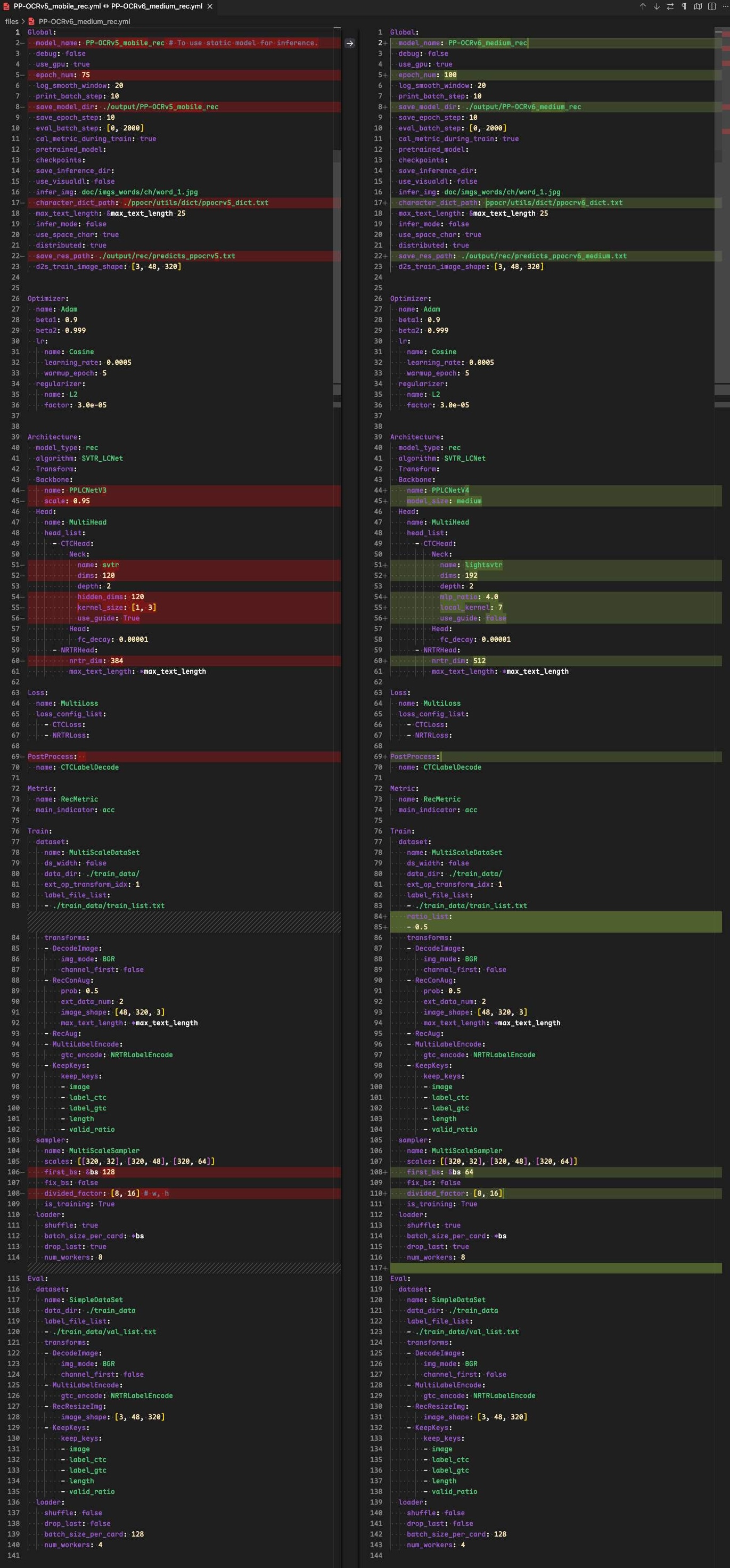
从上图中可以看出,配置基本一模一样,backbone 换了,但是前后处理配置是一样的。因此现有 rapidocr 前后推理代码可以直接使用。
| from rapidocr import RapidOCR
model_path = "models/PP-OCRv6_rec_medium/inference.onnx"
dict_path = "models/dict/ppocrv6_dict.txt"
engine = RapidOCR(params={"Rec.model_path": model_path, "Rec.rec_keys_path": dict_path})
img_url = "https://paddle-model-ecology.bj.bcebos.com/paddlex/imgs/demo_image/general_ocr_rec_001.png"
result = engine(img_url)
print(result)
result.vis("vis_result.jpg")
|

4. 模型精度测试
Warning
测试集 text_det_test_dataset 包括卡证类、文档类和自然场景三大类。其中卡证类有 82 张,文档类有 75 张,自然场景类有 55 张。缺少手写体、繁体、日文、古籍文本、拼音、艺术字等数据。因此,该基于该测评集的结果仅供参考。
欢迎有兴趣的小伙伴,可以和我们一起共建更加全面的测评集。
该部分主要使用 TextRecMetric 和测试集 text_rec_test_dataset 来评测。
需要注意的是,PP-OCRv6 rec系列模型在语言覆盖单一模型统一支持简体中文、繁体中文、英文、日文及 46 种拉丁语系语言共 50 种语言(tiny 档支持 49 种,不含日文)。 当前测试集并未着重收集以上场景。因此以下指标会有些偏低。如需自己使用,请在自己场景下测试效果。
需要安装的包如下:
| pip install datasets
pip install text_rec_metric
|
⚠️注意:下面代码用的是 rapidocr==3.8.4 版本。其中,下面代码仅写了 medium 模型测试,small 和 tiny 模型同理。
| import time
import cv2
import numpy as np
from paddlex import create_model
from tqdm import tqdm
from datasets import load_dataset
engine = create_model(model_name="PP-OCRv6_medium_rec")
dataset = load_dataset("SWHL/text_rec_test_dataset")
test_data = dataset["test"]
content = []
for i, one_data in enumerate(tqdm(test_data)):
img = np.array(one_data.get("image"))
img = cv2.cvtColor(img, cv2.COLOR_RGB2BGR)
t0 = time.perf_counter()
result = next(engine.predict(input=img, batch_size=1))
elapse = time.perf_counter() - t0
rec_text = result["rec_text"]
if len(rec_text) <= 0:
rec_text = ""
elapse = 0
gt = one_data.get("label", None)
content.append(f"{rec_text}\t{gt}\t{elapse}")
with open("pred.txt", "w", encoding="utf-8") as f:
for v in content:
f.write(f"{v}\n")
from text_rec_metric import TextRecMetric
metric = TextRecMetric()
pred_path = "pred.txt"
metric = metric(pred_path)
print(metric)
|
| import time
import cv2
import numpy as np
from rapidocr import EngineType, OCRVersion, RapidOCR
from tqdm import tqdm
from datasets import load_dataset
model_path = "models/official_models/PP-OCRv6_medium_rec"
dict_path = "models/dict/ppocrv6_dict.txt"
engine = RapidOCR(
params={
"Rec.model_dir": model_path,
"Rec.rec_keys_path": dict_path,
"Rec.engine_type": EngineType.PADDLE,
"Rec.ocr_version": OCRVersion.PPOCRV5,
}
)
dataset = load_dataset("SWHL/text_rec_test_dataset")
test_data = dataset["test"]
content = []
for i, one_data in enumerate(tqdm(test_data)):
img = np.array(one_data.get("image"))
img = cv2.cvtColor(img, cv2.COLOR_RGB2BGR)
t0 = time.perf_counter()
result = engine(img, use_rec=True, use_cls=False, use_det=False)
elapse = time.perf_counter() - t0
rec_text = result.txts[0]
if len(rec_text) <= 0:
rec_text = ""
elapse = 0
gt = one_data.get("label", None)
content.append(f"{rec_text}\t{gt}\t{elapse}")
with open("pred.txt", "w", encoding="utf-8") as f:
for v in content:
f.write(f"{v}\n")
|
| import time
import cv2
import numpy as np
from rapidocr import RapidOCR
from tqdm import tqdm
from datasets import load_dataset
model_path = "models/PP-OCRv6_rec_medium/inference.onnx"
dict_path = "models/dict/ppocrv6_dict.txt"
engine = RapidOCR(
params={
"Rec.model_path": model_path,
"Rec.rec_keys_path": dict_path,
}
)
dataset = load_dataset("SWHL/text_rec_test_dataset")
test_data = dataset["test"]
content = []
for i, one_data in enumerate(tqdm(test_data)):
img = np.array(one_data.get("image"))
img = cv2.cvtColor(img, cv2.COLOR_RGB2BGR)
t0 = time.perf_counter()
result = engine(img, use_rec=True, use_cls=False, use_det=False)
elapse = time.perf_counter() - t0
rec_text = result.txts[0]
if len(rec_text) <= 0:
rec_text = ""
elapse = 0
gt = one_data.get("label", None)
content.append(f"{rec_text}\t{gt}\t{elapse}")
with open("pred.txt", "w", encoding="utf-8") as f:
for v in content:
f.write(f"{v}\n")
from text_rec_metric import TextRecMetric
metric = TextRecMetric()
pred_path = "pred.txt"
metric = metric(pred_path)
print(metric)
|
指标汇总如下(以下指标均为 CPU 下计算所得):
| Exp |
模型 |
推理框架 |
模型格式 |
ExactMatch↑ |
CharMatch↑ |
Elapse↓ |
| 1 |
PP-OCRv6_medium_rec |
PaddleX |
PaddlePaddle |
0.8677 |
0.9512 |
0.0606 |
| 2 |
PP-OCRv6_small_rec |
PaddleX |
PaddlePaddle |
0.8419 |
0.9515 |
0.0272 |
| 3 |
PP-OCRv6_tiny_rec |
PaddleX |
PaddlePaddle |
0.6903 |
0.8906 |
0.008 |
|
|
|
|
|
|
|
| 4 |
PP-OCRv6_medium_rec |
RapidOCR |
PaddlePaddle |
0.8613 |
0.9491 |
0.0602 |
| 5 |
PP-OCRv6_small_rec |
RapidOCR |
PaddlePaddle |
0.8419 |
0.9515 |
0.029 |
| 6 |
PP-OCRv6_tiny_rec |
RapidOCR |
PaddlePaddle |
0.6968 |
0.8897 |
0.0078 |
|
|
|
|
|
|
|
| 7 |
PP-OCRv6_medium_rec |
RapidOCR |
ONNX Runtime |
0.8613 |
0.9491 |
0.0515 |
| 8 |
PP-OCRv6_small_rec |
RapidOCR |
ONNX Runtime |
0.8419 |
0.9515 |
0.0143 |
| 9 |
PP-OCRv6_tiny_rec |
RapidOCR |
ONNX Runtime |
0.6968 |
0.8897 |
0.003 |
|
|
|
|
|
|
|
| 10 |
PP-OCRv5_mobile_rec |
PaddleX |
PaddlePaddle |
0.7323 |
0.9161 |
0.0778 |
| 11 |
PP-OCRv5_mobile_rec |
RapidOCR |
PaddlePaddle |
0.7355 |
0.9177 |
0.0772 |
| 12 |
PP-OCRv5_mobile_rec |
RapidOCR |
ONNX Runtime |
0.7355 |
0.9177 |
0.0174 |
| 13 |
PP-OCRv5_mobile_rec |
RapidOCR |
PyTorch |
0.7355 |
0.9177 |
0.094 |
| 14 |
PP-OCRv4_mobile_rec |
RapidOCR |
ONNX Runtime |
0.8323 |
0.9355 |
- |
|
|
|
|
|
|
|
| 15 |
PP-OCRv5_server_rec |
PaddleX |
PaddlePaddle |
0.8097 |
0.9424 |
0.0777 |
| 16 |
PP-OCRv5_server_rec |
RapidOCR |
PaddlePaddle |
0.8129 |
0.9431 |
0.0775 |
| 17 |
PP-OCRv5_server_rec |
RapidOCR |
ONNX Runtime |
0.8129 |
0.9431 |
0.0655 |
| 18 |
PP-OCRv5_server_rec |
RapidOCR |
PyTorch |
0.8129 |
0.9431 |
0.0725 |
| 19 |
PP-OCRv4_server_rec |
RapidOCR |
ONNX Runtime |
0.7968 |
0.9381 |
- |
| 20 |
PP-OCRv4_doc_server_rec |
RapidOCR |
ONNX Runtime |
0.8098 |
0.9444 |
- |
从以上结果来看,可以得到以下结论:
- Exp1-3 和 Exp4-5 相比,指标差异不大,说明文本识别 前后处理代码可以共用。
- Exp4-6 和 Exp7-9 相比,mobile 模型转换为 ONNX 格式后,指标几乎一致,说明 模型转换前后,误差较小,推理速度也有提升。
- Exp1-9 和 Exp10-20 相比,PP-OCRv6 small 和 medium 模型的各个指标均要高于 PP-OCRv5 mobile / server 和 PP-OCRv4 server。
- 考虑到 PP-OCRv6 各个模型存储大小:medium 73M, small 20M 和 tiny 4.3M。后续会考虑将 PP-OCRv6 small 作为默认模型。
5. 集成到 rapidocr 中
该部分主要包括将字典文件写入 ONNX 模型、托管模型到魔搭和更改 rapidocr 代码适配等。
字典文件写入 ONNX 模型
该步骤仅存在文本识别模型中,文本检测模型没有这个步骤。
详细代码
| from pathlib import Path
from typing import List, Union
import onnx
import onnxruntime as ort
from onnx import ModelProto
def read_txt(txt_path: Union[Path, str]) -> List[str]:
with open(txt_path, "r", encoding="utf-8") as f:
data = [v.rstrip("\n") for v in f]
return data
class ONNXMetaOp:
@classmethod
def add_meta(
cls,
model_path: Union[str, Path],
key: str,
value: List[str],
delimiter: str = "\n",
) -> ModelProto:
model = onnx.load_model(model_path)
meta = model.metadata_props.add()
meta.key = key
meta.value = delimiter.join(value)
return model
@classmethod
def get_meta(
cls, model_path: Union[str, Path], key: str, split_sym: str = "\n"
) -> List[str]:
sess = ort.InferenceSession(model_path)
meta_map = sess.get_modelmeta().custom_metadata_map
key_content = meta_map.get(key)
key_list = key_content.split(split_sym)
return key_list
@classmethod
def del_meta(cls, model_path: Union[str, Path]) -> ModelProto:
model = onnx.load_model(model_path)
del model.metadata_props[:]
return model
@classmethod
def save_model(cls, save_path: Union[str, Path], model: ModelProto):
onnx.save_model(model, save_path)
dict_path = "models/dict/ppocrv6_dict.txt"
dicts = read_txt(dict_path)
model_path = "models/PP-OCRv6_rec_medium/inference.onnx"
model = ONNXMetaOp.add_meta(model_path, key="character", value=dicts)
new_model_path = Path("models/onnx/rec") / "PP-OCRv6_rec_medium.onnx"
ONNXMetaOp.save_model(new_model_path, model)
t = ONNXMetaOp.get_meta(new_model_path, key="character")
print(t)
print(len(t))
|
托管模型到魔搭
该部分主要是涉及模型上传到对应位置,并合理命名。注意上传完成后,需要打 Tag,避免后续 rapidocr whl 包中找不到模型下载路径。
我这里已经上传到了魔搭上,详细链接参见:link
写在最后
这部分代码会集成到 rapidocr==3.9.0 中。相关工作正在进行中,欢迎持续关注。
